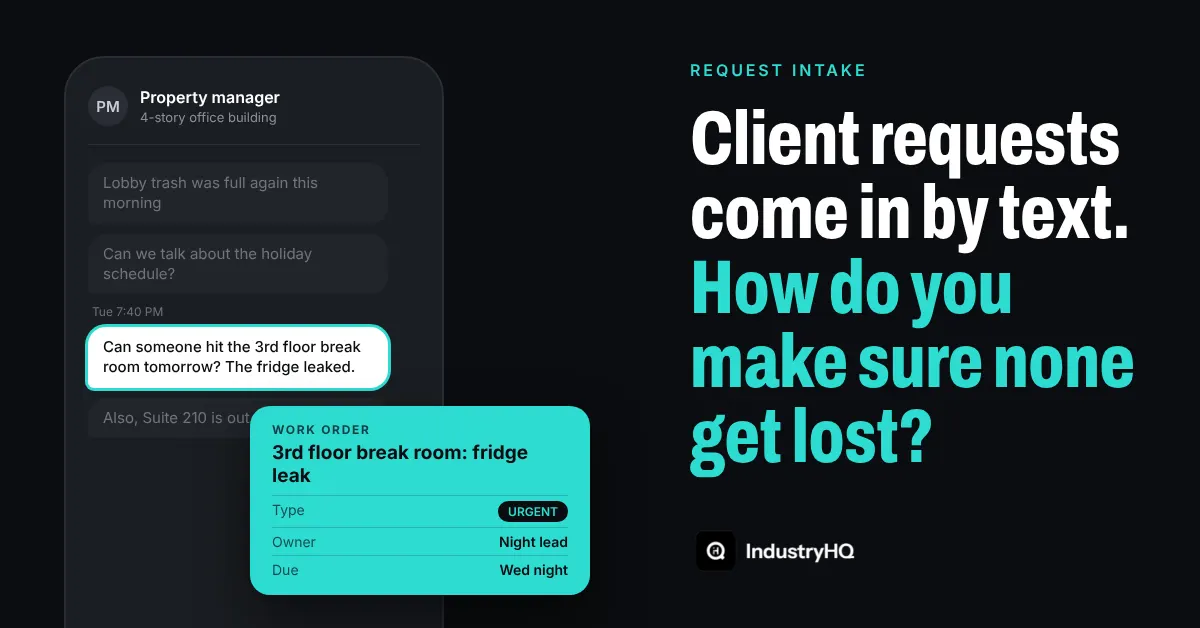
A property manager texts your supervisor at 7:40 on a Tuesday night: "Can someone hit the 3rd floor break room tomorrow? The fridge leaked."
Your supervisor is busy and reads it quickly, forgetting to respond. They mean to forward it to the night lead. By the time they get home, 4 more texts have come in, and the break room slides down the thread.
Nobody did anything wrong. The request was seen. It just never landed anywhere that guaranteed someone would act on it. Two days later the property manager asks again, a little shorter this time.
Texting isn't the problem. Clients text because it's fast and because it works for them. The problem is that a text is a conversation, not a record. If you want every request handled, each one needs to move out of the conversation and into a place where it has an owner, a deadline and an ending.
Why texted requests slip through
Most cleaning companies don't have a request process. They have habits that grew up account by account:
- Requests go to people, not to the company. The client texts whoever they know best, often a supervisor's personal phone. If that supervisor is off, sick or leaves the company, the requests go with them.
- Seeing a request feels like handling it. Reading a text and replying "on it" creates the feeling that it's taken care of. Nothing has actually been scheduled.
- There's no list to check. Ask an owner how many client requests are open right now and most can't answer. The requests exist, scattered across a dozen phones and inboxes.
- Nobody closes the loop with the client. Even when the work gets done, the client often doesn't hear about it, so they assume it didn't happen.
A simple intake system that works with texting
You don't need to stop clients from texting. You need a rule for what happens after the text arrives. Here's a method that works with any tools, from a shared spreadsheet to software.
1. Pick one place where every request lives
Choose a single list that the whole company treats as the source of truth. Every request, whether it arrives by text, email, phone call or a comment to a cleaner on site, gets written there. If it's not on the list, it doesn't exist.
This turns "did anyone see that text?" into "is it on the list?", which anyone can check.
2. Log it within the hour
Set a clear standard: whoever receives a request logs it within 1 hour, or before the end of their shift if they're on site. Each entry needs only a few things:
- The account and the exact location, such as "3rd floor break room," not "the building."
- What the client asked for, in their words if possible.
- Who asked and when.
- A photo, if the client sent one or you can take one.
Make logging fast enough to do from a phone in under a minute. If it takes longer, people put it off, and that's how requests get lost.
3. Sort it into one of 3 types
Not every request is the same, and treating them all alike either slows down urgent work or lets small items pile up. Sort each one:
- Urgent: a spill, a leak, a restroom out of supplies or anything a visitor would notice today. Handle it the same day.
- Routine: a missed spot, a trash can that keeps overflowing, a request to adjust the cleaning order. Fold it into the next scheduled visit.
- Extra work: carpet extraction, a post-event cleanup or anything outside your scope. Send a quote before doing the work, so it gets billed instead of absorbed.
That third category matters. Many companies quietly lose money on "quick favors" that were really billable work.
4. Give it one owner and a due date
Every request on the list gets a named person responsible for it and a date it should be done. "Night crew" is not an owner. "Maria, by Thursday" is.
5. Reply to the client twice
Send a short reply when the request is logged ("Got it, we'll take care of the break room tomorrow night") and another when it's done, ideally with a photo. The second message is the one most companies skip, and it's the one clients remember. It turns a complaint into proof that you follow through.
6. Review open requests every week
Once a week, look at everything still open. Anything past due gets a direct follow-up. Then look for patterns: if one account generates 6 requests a month and another generates none, that tells you where your crews need support and which client relationship needs a conversation.
A worked example
Here's how the method plays out at a hypothetical 4-story office building.
On Tuesday night the property manager texts the supervisor about the leaking fridge. The supervisor pulls over, logs it as urgent for the 3rd floor break room, attaches the client's photo and assigns it to the night lead for Wednesday. They text back: "Logged. Night crew will handle it tomorrow."
Wednesday night the night lead cleans the floor and the fridge area, takes an after photo and marks it done. Thursday morning the supervisor sends the property manager the photo with a one-line note.
On Friday the same property manager asks if the crew can shampoo the lobby carpet before a tenant event. The supervisor logs it as extra work, sends a quote that afternoon and schedules it once it's approved. That job gets invoiced instead of becoming a favor.
At the weekly review, the supervisor notices this building has had 3 break room requests in a month. They add the break room to the nightly checklist, and the requests stop.
Warning signs your requests are slipping
- Clients start messages with "Just following up" or "As I mentioned."
- A supervisor's day off means requests for their accounts sit untouched.
- Crews regularly do extra tasks that never show up on an invoice.
- Nobody can tell you how many requests are open right now.
Start this week
Pick your 5 busiest accounts. For the next 30 days, log every request from those clients in one list, sort it by type, assign an owner and send the 2 replies. At the end of the month, count how many requests came in and how many were closed on time.
That number is your baseline, and it's usually enough to convince the rest of the team to adopt the routine everywhere.
Where IndustryHQ fits
IndustryHQ gives every request one home. When a client texts, your supervisor can log it as a work order from their phone in seconds, attach the photo, assign an owner and set a due date. Crews close it out with an after photo you can send straight to the client. You can see every open request across all your buildings in one place, without scrolling through anyone's texts.
Unlimited users are included on every plan, so every supervisor and cleaner can log and close requests themselves.
Start a free 14-day trial or book a demo at industryhq.io